QClipz
Two tools for short-form video: an area-first screen recorder for Windows built with Tauri and Rust, and a web studio that turns a talking-head clip into a typographic quote video.
- Category
- Desktop
- Year
- 2026
- Stack
- Rust, Tauri, React, TypeScript, Next.js, Remotion
- Tools
- FFmpeg, WASAPI, Vite, Deepgram, OpenRouter, Pixabay API, Zustand
- Figure
- ~25% less CPU in v0.9.2
- Figure
- A/V sync within ~50 ms
- Figure
- Open source, MIT
Overview
QClipz is two tools built around one job: making short-form video quickly. QClipz Desktop records exactly the part of a Windows screen you mean, and QClipz Studio turns a talking-head clip into an edited, typographic quote video. They share a name and an audience: someone who records, trims, and posts often.
QClipz Desktop
A fast, no-fuss screen recorder for Windows 10 and 11, released as open source under the MIT license (currently v0.9.2).
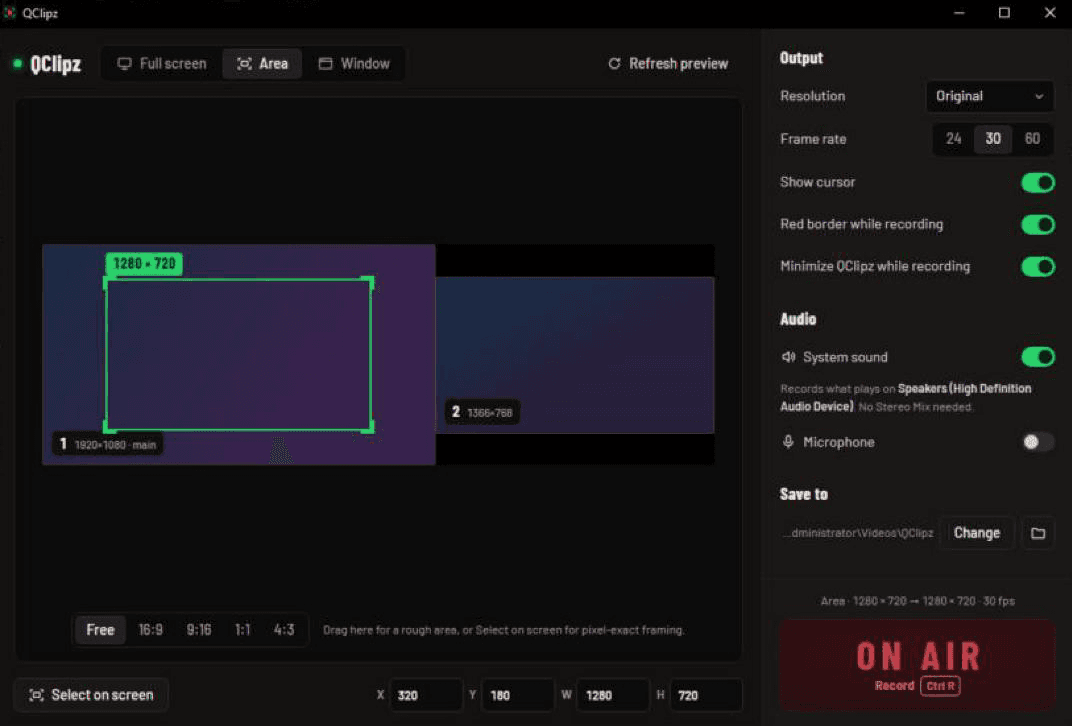
- Area-first. Drag a rectangle on any monitor, lock it to 9:16 for Shorts or 16:9 for YouTube, choose exact sizes like 1080×1920, and press R to record straight from the overlay.
- Three sources. Full screen (one monitor or all of them, picked on a live map), a dragged area, or a single window.
- Never in its own shot. The main window, the floating ON AIR bar, and the red border are excluded from capture.
- System sound without the hassle. WASAPI loopback records what you hear with no Stereo Mix or virtual cable, mixed with an optional microphone.
- Private by design. No account, no telemetry, no network calls. Recordings stay on disk.
How it is built
- Selector UI (React)
- Tauri 2 commands (Rust)
- ffmpeg ddagrab capture
- WASAPI audio on one clock
- Mux on stop
- H.264 mp4
The interface is React and TypeScript on Vite, running in a Tauri 2 WebView. The Rust side drives a bundled ffmpeg for capture (Desktop Duplication through ddagrab, with a GDI fallback for areas that span monitors) and captures audio in-process through cpal on WASAPI.
Engineering for old hardware
QClipz was built and tuned on a 2011 Intel i5 laptop, which made performance problems impossible to ignore:
- Frame rate with audio on (v0.9.1). Recording with system sound or a mic could drop to 3 to 8 fps, because ffmpeg paced the screen grab to the live audio inputs. Audio is now captured by QClipz itself on one shared clock and muxed in when recording stops. Video holds at about 28 to 29 fps at 1366×768 on that laptop, with audio and video aligned within about 50 ms.
- CPU headroom (v0.9.2). Lighter color conversion and a low-latency encoder setting cut CPU use while recording by about 25%, and the recorder runs below normal priority so the game or video being recorded stays smooth.
- No stutter on record. The floating bar and border used to be created at the moment you pressed Record, each starting a browser renderer. They are now created once at startup and only shown when recording begins.
- Quiet audio. An optional loudness boost brings quiet recordings up to about −16 LUFS with a limiter, and never makes audio quieter.
QClipz Studio
A web app that edits "quote clips": a person talking, cut into short phrases, each phrase revealed word by word as an elegant typographic composition, intercut with moody b-roll and black title cards.
- Upload clip
- Deepgram transcript
- LLM scene plan
- Pixabay b-roll
- Remotion preview
- Server render
- Transcription. Deepgram returns word-level timestamps, so every word can appear exactly when it is spoken.
- Scene planning. An LLM (through OpenRouter, model selectable) splits the transcript into 2 to 7 word phrases at natural breath points and assigns each one a visual type (speaker, b-roll, or title card), a grade, a b-roll search query, and one of four typography templates.
- Editing. The plan is fully editable in a timeline and scene panel built with Next.js, shadcn/ui, and Zustand, with a live Remotion Player preview.
- Rendering. The Remotion composition is bundled once and cached until its source changes, then rendered on the server with progress streamed back to the editor.
QClipz Studio is a private project and is not publicly deployed.
Stack
| Layer | Desktop | Studio |
|---|---|---|
| Interface | React 19, TypeScript, Vite | Next.js 16, React 19, shadcn/ui, Tailwind CSS |
| Core | Tauri 2, Rust, cpal (WASAPI) | Remotion, Zustand |
| Media | Bundled FFmpeg, H.264 mp4 | Remotion renderer |
| Services | None, fully offline | Deepgram, OpenRouter, Pixabay |